

RME Advanced Remote Control ARC For Fireface UCX & UFX
$299.00
RME-ARCUSB
RME Advanced Remote Control ARC For Fireface UCX & UFX
$299.00
Guaranteed Safe Checkout:
Overview
This wired Advanced Remote Control (ARC) has been designed for direct access to the most frequently used actions and commands required in a studio's daily work. Its extremely flexible configuration through TotalMix FX will simplify the workflow and greatly increase the usability of the RME interface in any real world situation.
* The Advanced Remote Control (ARC) can be used with all Fireface UCX. It can also be used with all Fireface UFX with a serial number 23241707 (built after June 2011) or higher. Upcoming interfaces that feature an Advanced Remote Control connector will also be compatible. Users that own a Fireface UFX with a serial number below 23241707 have to send their UFX to their distributor as it requires a hardware modification to be fully compatible to the Advanced Remote Control. This modification is not free of charge.
The ARC consists of a solid metal case with a main encoder dial, 2 push buttons and 6 LED-equipped buttons. The Remote Control connects to the main interface via a 5 m (16.4 ft.) cable and a special connector on the back of both units.
Supported Features

The top of the Advanced Remote Control features a rotary encoder with push switch function, 2 lower buttons, and 6 upper buttons with Status LED. The rotary encoder is used to change various parameters, like gain and volume. The left button Prog is programmable, and can perform several functions. The same is true for the upper 6 buttons, which also include a status LED to signal the current state.
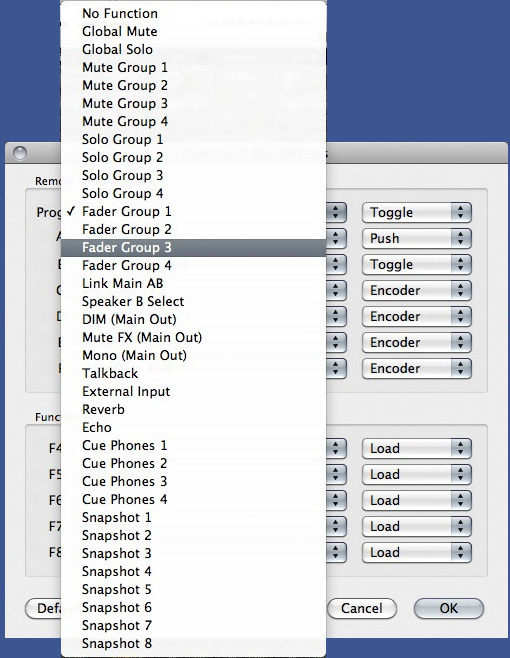
The ARC provides default settings for the 7 programmable buttons, but can be freely configured via the Key Commandsdialog of TotalMix FX. All buttons can be assigned to more than 36 different commands. The behaviour of each individual button can be changed between push, toggle, enable and disable, depending on the base function.
Available commands/actions (examples):
- Main Volume
- Global Mute
- Global Solo
- Mute Group 1 to 4
- Solo Group 1 to 4
- Fader Group 1 to 4
- Link Main AB
- Speaker B Select
- DIM (Main Out)
- Mute (Main Out)
- Mute FX (Main Out)
- Mono (Main Out)
- External Input
- Reverb
- Echo
- Cue Phones 1 to 4
- Snapshot 1 to 8
- Mic Gains
- Inst. Gains
- Volume Phones
Several functions can be activated at the same time. Example: Button A is set to Cue Phones 1. That means the phones submix is heard via the Main output (the studio monitors). Now to be able to also change the volume of the phones submix itself, set button B to Volume Phones 1. Activating both will allow you to listen to the phones submix via the main output, and also to change its volume (the fader in the third row) by turning the encoder knob.
In stand-alone mode of Fireface 802, UCX and UFX there is no TotalMix FX on the host computer. Therefore the settings for the ARC are no longer available. Instead a fixed set of functions is activated:
- Turn Encoder: Main Out volume
- Push on Encoder: Dim for Main Out
- Recall button: Recall function for Main Out
- Prog: no function
- Buttons A to F: load Setup 1 to 6


FAQs
What are the shipping costs for WA, NT, TAS, and New Zealand?
Free shipping is not available to WA, NT, TAS, or New Zealand. Freight charges for these locations will be displayed in your cart on checkout. If your delivery address is rural or our couriers can't service your area, we will ship via Australia Post. International shipping is currently limited to Revv Amplification products for New Zealand, with freight calculated at checkout. Purchasers are responsible for all incoming taxes and customs charges.
How long does shipping take?
We strive to process orders promptly and usually ship the following working day. Most orders are delivered within 5 working days from shipping notification. Please allow up to 10 working days for delivery to Western Australia. Deliveries are sent via courier, and you will receive tracking information via email when your order is dispatched. Please note, free shipping is not available to WA, NT, TAS or New Zealand.
What payment options do you accept?
We offer multiple convenient payment methods. We accept all major credit cards (Visa, Mastercard), Apple Pay, Google Pay, PayPal, Zip and Afterpay. You don't need a PayPal account to checkout; you can simply use your credit card.
Do you offer rent-to-own or product rental?
Yes, we offer Studio 19 Rental. You can rent the product of your dreams with no commitment to buy—just a minimum 6-month rental period. After 6 months, you can upgrade to the latest gear, or you can apply to buy at any time. To start a rental, click the "Rent Now" button on the product page .